
Walk into a busy Waffle House and you may see a jelly packet sitting sideways on an empty plate.
That packet is not waiting for toast. It has been promoted into middle management.
Waffle House uses a system called Pull, Drop, Mark to move orders through the kitchen. The server calls the order. The team pulls the meat, drops the hash browns, and marks plates with combinations of condiment packets and utensils. Those visual codes tell grill operators what is cooking and what comes next, so the kitchen does not have to hold every order in somebody's memory. Waffle House says the system keeps the team synchronized and lets operators read upcoming work at a glance. Waffle House explains its Pull, Drop, Mark system here.
An AI agent workflow solves the same kind of problem. It organizes a multi-step AI job so the system knows what to do, what information to carry forward, what happens next, and when a person needs to step in.
The cook still needs skill. The restaurant also needs a way to coordinate the order.
That is the difference between an AI skill and a workflow graph.
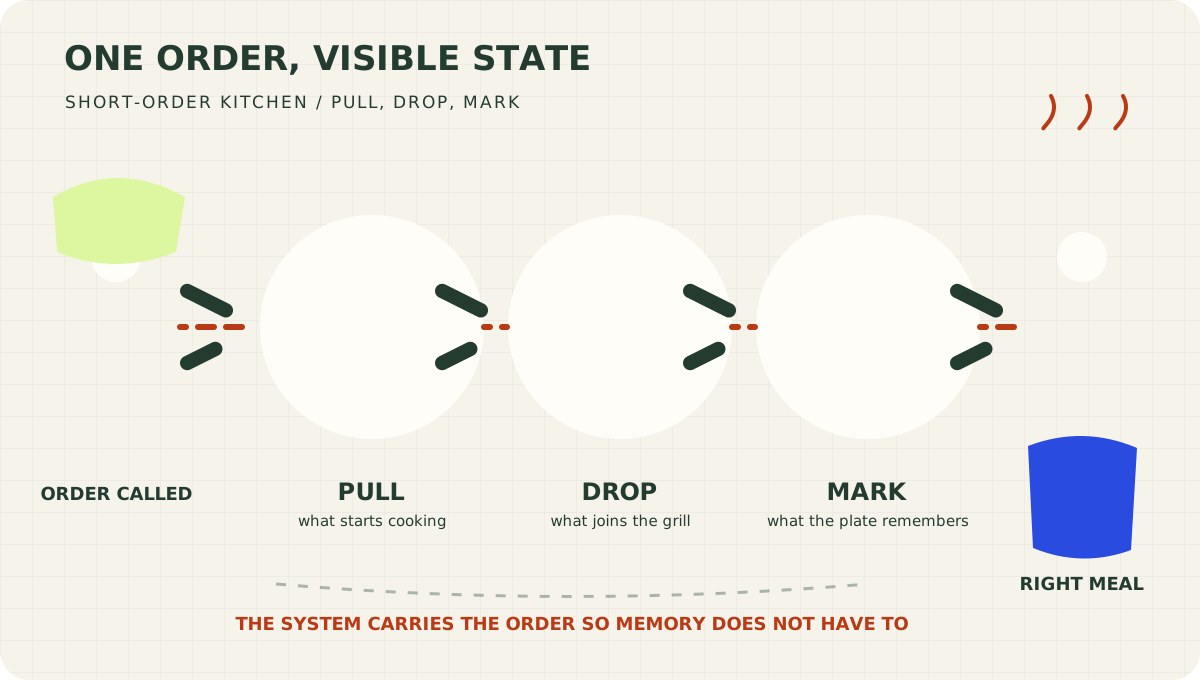
The jelly packet is not the cook. It is part of the system that helps several skilled people produce the right breakfast together.
What is an AI agent workflow?
An AI agent workflow is a sequence of steps, decisions, tools, and checks used to complete a job. The AI may choose how to perform some steps, but the workflow defines the larger operating structure.
That structure is often drawn as a graph.
A graph is simply a collection of nodes and edges:
- A node does something.
- An edge determines where the work goes next.
- State carries useful information through the process.
A node might research a company, calculate a price, draft an email, check a result, or ask a human for approval. An edge might say, "Continue if the data is complete" or "Return to research if confidence is low."
LangGraph describes agent workflows with the same three-part model: state, nodes, and edges. Nodes contain the work. Edges route the next step, including fixed sequences, conditional branches, parallel paths, and loops. See LangGraph's Graph API overview.
Here is the basic shape:
Request
   ↓
Gather information
   ↓
Is anything missing?
  ↙              ↘
Yes               No
 ↓                 ↓
Ask a person     Perform the work
                    ↓
                Check the result
                 ↙          ↘
              Failed       Passed
                ↓             ↓
              Retry        Deliver
Congratulations. You understand graphs.
You may now approach the whiteboard with the confidence of a consultant who has recently discovered arrows.
The three different graphs people mean in AI
AI people use one word for several related ideas, because apparently naming things once was not sufficiently exciting.
Workflow graphs
Workflow graphs organize actions. They show which step runs first, where information travels, what conditions create a different path, and when the work ends.
This is the graph most business operators need to understand first.
Knowledge graphs
Knowledge graphs organize information through relationships. A graph might connect a customer to a company, the company to a contract, and the contract to a renewal date.
Graph databases store nodes, relationships, and properties so the connections are part of the data rather than an afterthought. Neo4j's introduction provides a useful visual explanation.
Computational graphs
Computational graphs represent mathematical operations inside machine-learning systems. They matter to people training and optimizing models.
They matter somewhat less to Denise, who wants an AI assistant to stop sending the same customer two follow-up emails.
For the rest of this article, graph means a workflow graph: the map governing how an AI system gets a complete job done.
AI graphs vs AI skills
An AI skill is a reusable way to perform a particular kind of work.
It might contain instructions, scripts, examples, templates, or reference material. Anthropic describes Agent Skills as modular capabilities that package instructions, metadata, and optional resources, then load when they are relevant. Its Agent Skills overview explains that architecture.
A skill answers:
How should I perform this job?
A graph answers:
When should this job happen, what should it receive, and where should its result go?
| AI skill | Workflow graph | |
|---|---|---|
| Primary job | Perform one kind of work well | Coordinate the complete process |
| Main question | How do I do this? | What happens next? |
| Example | Research a property | Decide when research is required |
| Contains | Instructions, scripts, examples, references | Steps, routes, conditions, state, stop rules |
| Typical failure | The step is performed badly | The wrong step runs at the wrong time |
| Breakfast version | Knowing how to cook an egg | Getting the correct order to the correct cook |
A property-underwriting skill might define how to collect comparable sales, normalize square footage, handle missing facts, and calculate an offer range.
The graph decides when underwriting begins, what property data it receives, whether missing information must be collected, when a human reviews the price, and where the approved result goes afterward.
The skill is the cook.
The graph is the order system.
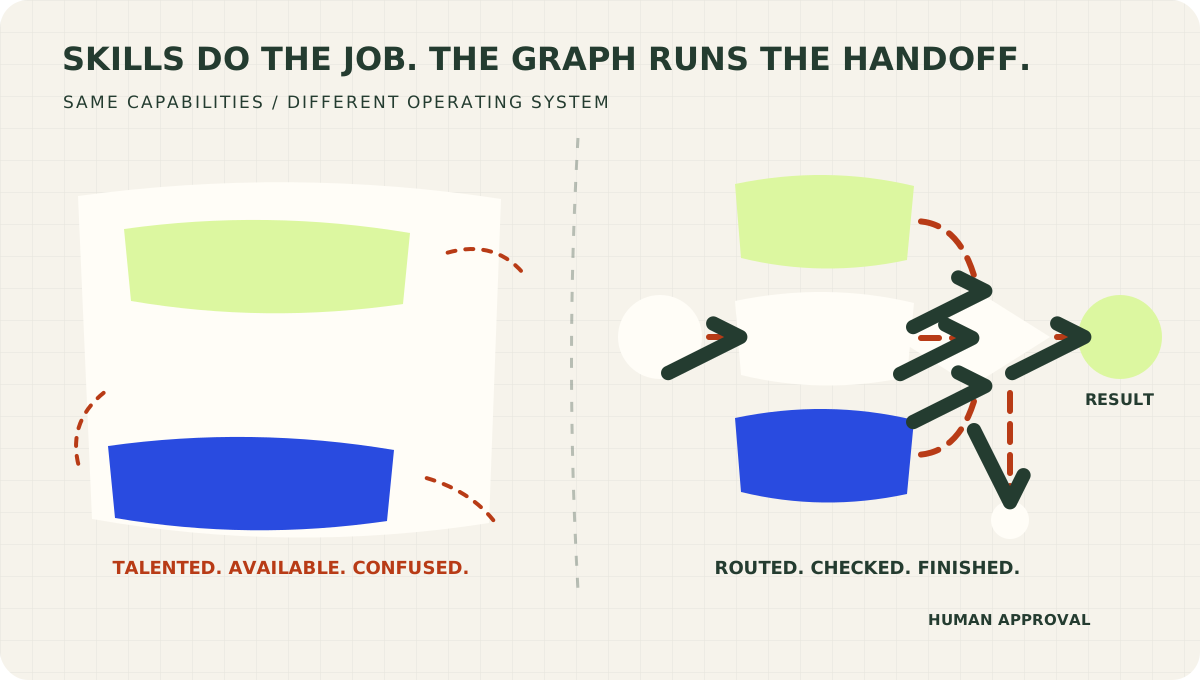
Useful skills without routing are a talented kitchen with no tickets. The graph gives each capability a time, an input, and a destination.
Why more skills do not automatically create a better AI system
Imagine giving a new employee this assignment:
Research every new lead, decide which ones are good, contact the right people, follow up later, update the CRM, and tell me when something important happens.
A capable employee would immediately need definitions.
- What makes a lead good?
- Which sources are authoritative?
- What if two sources disagree?
- Can the employee contact someone without approval?
- How many follow-ups are allowed?
- What counts as important?
- Where should the outcome be recorded?
- When should the process stop?
AI needs those answers too.
Without a graph, teams often hide the entire operation inside one enormous prompt. The prompt contains the instructions, routing, memory, safety rules, tool choices, and several increasingly desperate sentences about not doing anything weird.
That approach can work for a demo. It becomes difficult to inspect when the process grows.
If the final result is wrong, you need to know what failed.
Did the research skill gather weak evidence? Did the workflow choose the wrong branch? Did a later step receive stale information? Did the approval check never run? Did the agent enter a loop and spend forty minutes reconsidering the emotional significance of one spreadsheet cell?
A graph makes those questions answerable.
What an AI workflow graph gives you
A visible operating structure
The model can still use judgment inside a step. The graph makes the surrounding process explicit.
You might define a simple sequence:
Research → Analyze → Review → Deliver
Or add a decision:
Research → Confidence above 80%?
                  ↙       ↘
                No         Yes
                ↓           ↓
          Human review    Continue
The flexible thinking stays flexible. The expensive boundaries become visible.
State that travels with the work
A useful workflow accumulates information:
- The original request
- Facts collected
- Sources consulted
- Confidence and uncertainty
- Files created
- Decisions made
- Human feedback
- Retry counts
- Final outcomes
This is the workflow's state.
Think of it as a clipboard moving through the operation. Each step reads what it needs, adds what it learned, and hands the clipboard forward.
Without shared state, every step walks into the kitchen asking, "Which table ordered the waffles?" The team may still produce breakfast. Nobody should make plans for the rest of the morning.
Branches, retries, and stop conditions
Real work rarely follows one perfect line.
Documents are missing. Numbers conflict. A customer does not reply. A tool fails. Someone uploads a receipt photographed from what appears to be low Earth orbit.
Graphs let you define a response:
- If information is missing, request it.
- If confidence is low, escalate.
- If validation fails, retry.
- If the retry limit is reached, stop.
- If the action creates meaningful risk, require approval.
The stop condition deserves special attention. An agent without a finish line is a Roomba trapped beneath a couch. It remains industrious. It is no longer improving the room.
Human checkpoints
A mature AI system should know when autonomy ends.
You might allow an agent to draft a contract but require legal approval before sending it. You might let it calculate an offer but require a manager to approve the price. You might let it prepare an email while keeping the send action behind a person.
OpenAI's guidance for workspace agents recommends defining the job, choosing tools and triggers, and adding guardrails, approvals, and human checkpoints for sensitive actions. See OpenAI Academy's workspace-agent guide.
Those checkpoints are not evidence that automation failed.
They are evidence that an adult designed it.
A record you can improve
When a result fails, a visible workflow helps you locate the cause.
If the job was performed badly, improve the skill.
If the wrong job ran at the wrong time, improve the graph.
If the system had the right answer but took the wrong action, improve the permission or approval boundary.
That is how an AI experiment becomes an operating system rather than a slot machine with excellent grammar.
A simple AI agent workflow example
Suppose a real estate company wants AI to evaluate a new property lead.
The tempting version is one sentence:
Research the property, find comps, estimate repairs, calculate an offer, contact the seller, update the CRM, and try not to ruin Tuesday.
The stronger version separates the workflow from the skills inside it.
- A new lead starts the workflow.
- A validation step checks the address and required property facts.
- Missing information routes to a person or a data-enrichment step.
- A research skill collects property and market evidence.
- An underwriting skill calculates a range and records its assumptions.
- Low-confidence results route to human review.
- Approved results move to an offer-writing skill.
- A compliance check reviews the draft.
- A named person approves the send action.
- The workflow records the outcome and schedules the next appropriate step.
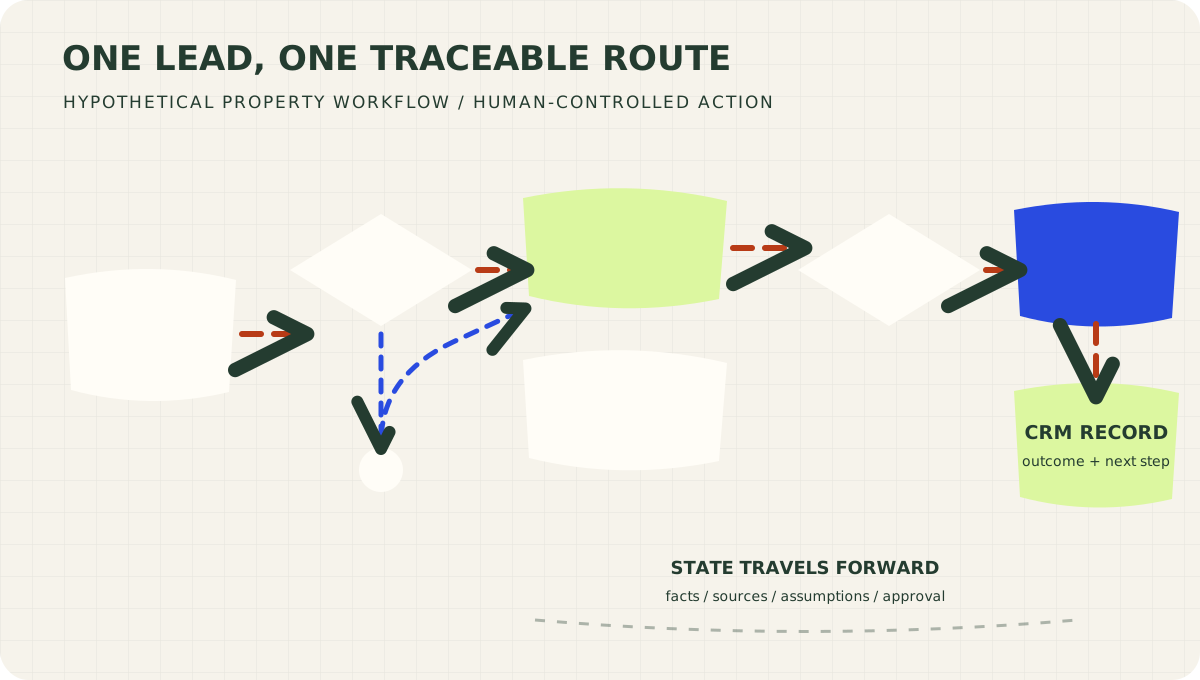
The graph coordinates the job. Specialized skills research, calculate, and write inside the steps where their judgment belongs.
This example is hypothetical. Its purpose is to show the architecture, not prescribe an underwriting or compliance policy.
Notice that the graph does not replace the skills. It calls them.
The validation node may use ordinary code. The research node may use an AI skill. The approval node belongs to a human. The CRM update may use a connector. The whole graph carries state from the original lead to the recorded outcome.
Different kinds of work can cooperate without pretending they are the same thing.
When should you use an AI agent workflow?
Not every AI task needs a graph.
If you want AI to summarize one document, you probably need a prompt or a skill. Building a twelve-node graph for that job is like installing air-traffic control so your nephew can fly a kite.
Consider a graph when the work includes several of these:
- Multiple dependent steps
- Conditional decisions
- Several agents, tools, or systems
- Information that must survive between steps
- Parallel work
- Repeated loops or follow-ups
- Human approvals
- Expensive mistakes
- Work that continues over time
- A need to explain what happened afterward
Start with the simplest structure that works.
A straight line is still a graph. Add a branch when the evidence shows that one path is not enough. Add a loop when retries are actually necessary. Add a human checkpoint where the action requires judgment or authority.
Complexity should be earned.
How to build your first AI agent workflow
You do not need to begin with software. Begin with a sheet of paper and one recurring job.
1. Draw the happy path
Write the steps that occur when everything goes correctly:
Request → Research → Draft → Review → Deliver
2. Circle the decisions
Where could the process take another route?
- Is information missing?
- Is confidence too low?
- Did validation pass?
- Does a person need to approve this?
- Should the system continue, retry, or stop?
Each meaningful decision may become a branch.
3. Name the state
List the information that later steps must know.
If a fact matters later, store it deliberately. Do not rely on the AI to remember it through enthusiasm.
4. Identify the skills
Which steps require a repeatable method?
Those are good candidates for skills. A research skill can preserve source rules. A writing skill can preserve format and voice. A validation skill can preserve a checklist.
Keep each skill focused on doing one kind of work well.
5. Add the unhappy paths
Ask what happens when:
- A source is unavailable
- Two numbers disagree
- A tool returns an error
- A person never responds
- A result fails review
- The workflow has already retried twice
A workflow is not ready for production until it has been introduced to disappointment.
6. Mark the approval boundaries
Decide which actions the AI may take and which require a named person.
Researching, drafting, sending, purchasing, deleting, and signing are not equally consequential verbs.
7. Test the smallest useful version
Run several realistic examples, including incomplete and messy ones. Watch where the workflow stalls, loses information, chooses the wrong branch, or asks for help too late.
Then change the correct layer:
- Bad execution inside a step: improve the skill.
- Bad sequence or routing: improve the graph.
- Bad access or action: improve the tool boundary.
- Bad judgment at meaningful risk: improve the approval gate.
Frequently asked questions
What is the difference between an AI workflow and an AI agent?
A workflow defines the structure used to complete a job. An agent can exercise judgment inside that structure, choose tools, and sometimes decide its own next step. A workflow can contain one agent, several agents, ordinary software, human actions, or all four.
Is an agentic workflow the same as an AI agent workflow?
The terms are often used interchangeably. "Agentic workflow" usually emphasizes that AI has some freedom to reason, choose tools, or adapt the next action instead of following only a rigid script.
What is a graph in an AI workflow?
A graph is the map of the workflow. Nodes represent actions or decisions. Edges connect those nodes and determine where the work moves next. State carries information through the graph.
What is the difference between an AI skill and a workflow?
A skill teaches AI how to perform a repeatable task. A workflow coordinates when that task runs, what it receives, what checks follow, and what happens next. A workflow may use many skills.
Do I need LangGraph to build an AI workflow graph?
No. You can express the same logic with ordinary code, automation platforms, visual builders, or another agent framework. LangGraph is one implementation of the pattern, not the definition of the pattern.
Should I start with skills or graphs?
Start with one useful job. If it is one bounded procedure, create a clear prompt or skill. If the job contains handoffs, decisions, memory, approvals, or recovery paths, draw the graph. Most mature systems eventually use both.
Map one workflow before adding another skill
The first wave of practical AI focused on capability:
Can the model perform this task?
The next wave focuses on coordination:
Can the system complete the whole process reliably?
Skills give AI specialized methods. Tools give it access. Models give it judgment. A graph turns those pieces into an operation.
This week, choose one recurring process and draw the dots and arrows. Name the information that must travel. Mark one decision, one failure path, and one human approval.
You do not need a complicated platform to begin. You need an honest map of the work.
Because a talented cook is valuable.
But when breakfast gets busy, even the cook appreciates a jelly packet with a management position.
Copy this into your AI platform
Use this brief to turn one recurring business process into a first workflow graph. The AI should help you map the work, not activate tools or publish anything on your behalf.
# First AI Agent Workflow Map

Help me map one recurring business process as a simple AI agent workflow.

## The job

- Process I want to improve:
- What starts it:
- Successful final result:
- Person responsible for the outcome:
- How often it happens:

## Build the map

1. List the current steps in the order they occur.
2. Identify the information required at each step.
3. Mark every decision that can change the route.
4. Identify repeatable procedures that should become AI skills.
5. Identify software tools or data connections required.
6. Add missing-information, tool-failure, and failed-review paths.
7. Define a retry limit and a clear stop condition.
8. Mark actions that require human approval.
9. Define the state that must travel between steps.
10. Recommend the smallest useful version I can test first.

## Required output

Give me:

- A plain-language summary of the workflow
- An ASCII diagram using nodes and arrows
- A table of nodes, owners, inputs, outputs, and failure paths
- A separate list of proposed AI skills
- Human approval points
- The first five test cases, including at least two messy cases
- The three biggest risks or unresolved decisions

Do not connect accounts, send messages, purchase anything, publish anything, or change external systems. Ask before making assumptions that could change the business outcome.