
A skill is a recipe.
That is useful. A good recipe can preserve judgment, stop people from improvising the important parts, and help a team produce the same result twice.
It is not a pantry, a cook, a timer, a quality check, or somebody noticing that the oven is on fire.
This distinction matters because AI products are rapidly adding the rest of the kitchen. Last week, from September 7 through September 13, 2026, OpenAI, Anthropic, xAI, Nous Research, Viktor, and Perplexity shipped or documented more of the machinery around the model: connected data, isolated workspaces, live steering, schedules, approval controls, persistent state, and reports that reveal which repeated work deserves to become a skill.
The headline is not that skills are obsolete.
The headline is that a skill finally has somewhere serious to work.
The AI stack is separating into layers
If every recurring process becomes one enormous prompt, the prompt eventually starts impersonating an IT department.
It carries the instructions, tool configuration, schedule, memory, branching logic, safety rules, and twelve paragraphs begging the agent not to do anything weird. Then someone changes a file path and the whole department calls in sick.
The cleaner architecture looks like this:
| Layer | Its actual job |
|---|---|
| Connector or MCP server | Gives the AI controlled access to current data and tools. |
| Skill | Preserves a bounded, reusable way to perform one kind of work. |
| Workflow or graph | Coordinates sequence, branches, parallel work, retries, and handoffs. |
| Agent | Chooses its own next steps when the route cannot be known in advance. |
| Schedule, loop, watcher, or event | Decides when the work starts or wakes again. |
| Durable state | Remembers prior runs, processed items, and checkpoints. |
| Approval gate | Keeps a human in control of consequential actions. |
| Evaluation and reporting | Shows whether the system helped, failed, or deserves standardization. |
These layers can live inside one product or across several. The labels will keep changing because the AI industry regards stable vocabulary as a personal insult. The responsibilities are more durable.
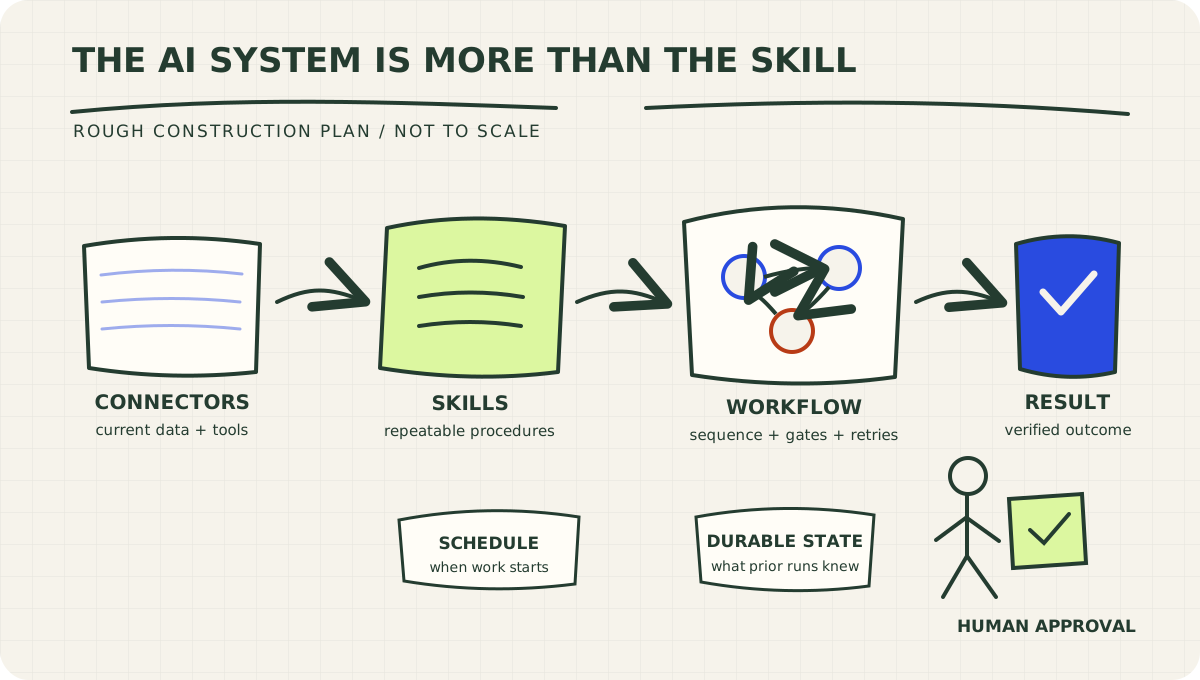
The model does the thinking. The surrounding structure makes the work dependable.
OpenAI moved the work closer to the data
On September 10, OpenAI added a Data plugin to ChatGPT Work and Codex. It can analyze connected business data, investigate why metrics changed, and build interactive dashboards and reports. OpenAI says users can install it and begin with @Data. The same release added Box, Dropbox, and SharePoint to Library alongside Google Drive, allowing current files to be found, mentioned, previewed, and cited without another upload. OpenAI's ChatGPT release notes.
The day before, Deep Research arrived inside ChatGPT Work and Codex. It can work across the web, files, and connected applications, produce a cited document, and accept steering while the research is underway.
That changes a recurring reporting job in a practical way.
The weak version looks like this:
- Export a spreadsheet.
- Upload it to a chat.
- Ask what happened.
- Forget which export the answer came from.
- Repeat next Wednesday with a slightly different prompt and a magnificent lack of institutional memory.
The stronger version connects an approved source, defines the metric once, preserves citations, and saves the procedure separately from the data connection.
The connector can fetch closed deals. Your operating instructions still have to define whether that means signed, funded, delivered, or merely celebrated in Slack.
How to implement it
- Connect one authoritative source before connecting every source.
- Write down the business definitions the model cannot infer safely.
- Require every conclusion to point back to a file, record, or query.
- Save the analysis method as a skill only after the same method has survived several real runs.
- Keep the connection and its credentials outside the skill.
This is a small design choice with large consequences. Live access belongs in the connector. Judgment belongs in the procedure. Do not tape the key to the recipe card.
Codex made long-running work easier to steer without mixing the workspaces
Codex CLI 0.154.0 added experimental managed worktrees through --worktree or /worktree. It also lets users answer inline questions while Codex keeps working, refreshes newly installed plugin tools and skills in existing sessions, and improves permission, sandbox, and MCP OAuth behavior. The September 8 iOS release similarly added live questions, task mentions, file navigation, and background worktree setup. OpenAI's Codex changelog.
A worktree is not a new personality for your agent. It is an isolated copy of the code where one task can make changes without colliding with another task or your main checkout.
For a business operator, the larger principle is this: parallel work needs separation.
If three agents research vendors in parallel, give each one a bounded assignment and a separate output. If two coding tasks change the same project, isolate their working state. If an agent asks a question halfway through a job, let the answer steer the active run without quietly replacing the original goal.
To use the referenced Codex release, update with:
npm install -g @openai/codex@0.154.0
Then test worktrees on a noncritical project. Isolation reduces collisions. It does not remove the need for tests, review, or a clear finish line.
Anthropic gave teams a better reason to create a skill
On September 10, Anthropic introduced Smart reports in beta for Claude Enterprise. The reports analyze how a team uses Claude, including completed work, cost, friction, and repeated patterns that may be worth packaging as shared skills. Claude's release notes.
That last part may be the most useful AI operating advice released all week.
Do not create a skill because a process sounds reusable. Create it because the process has repeated enough to reveal its stable steps, useful inputs, failure cases, and expected output.
Otherwise, you are laminating a guess.
A good candidate for a skill has:
- a recurring trigger;
- a recognizable input;
- a stable definition of done;
- judgment worth preserving;
- mistakes that clearer instructions can prevent.
A quarterly strategy decision probably should not become a rigid skill after one meeting. A weekly pipeline review that follows the same definitions, calculations, and exception rules probably should.
Anthropic's broader engineering guidance draws another useful line. It defines workflows as systems that follow predefined code paths, while agents dynamically choose their process and tools. It recommends starting with the simplest design and adding complexity only when it improves the result. Building effective agents.
That is the answer to the question, "Should we use graphs instead of skills?"
No. Use a graph to coordinate work. Use skills to perform repeatable parts of that work.
The graph can call the skills. It can send vendor research down parallel branches, reject weak evidence at a verification gate, combine the approved findings, and route the draft through an evaluator. The skills keep each branch from reinventing its method every time.
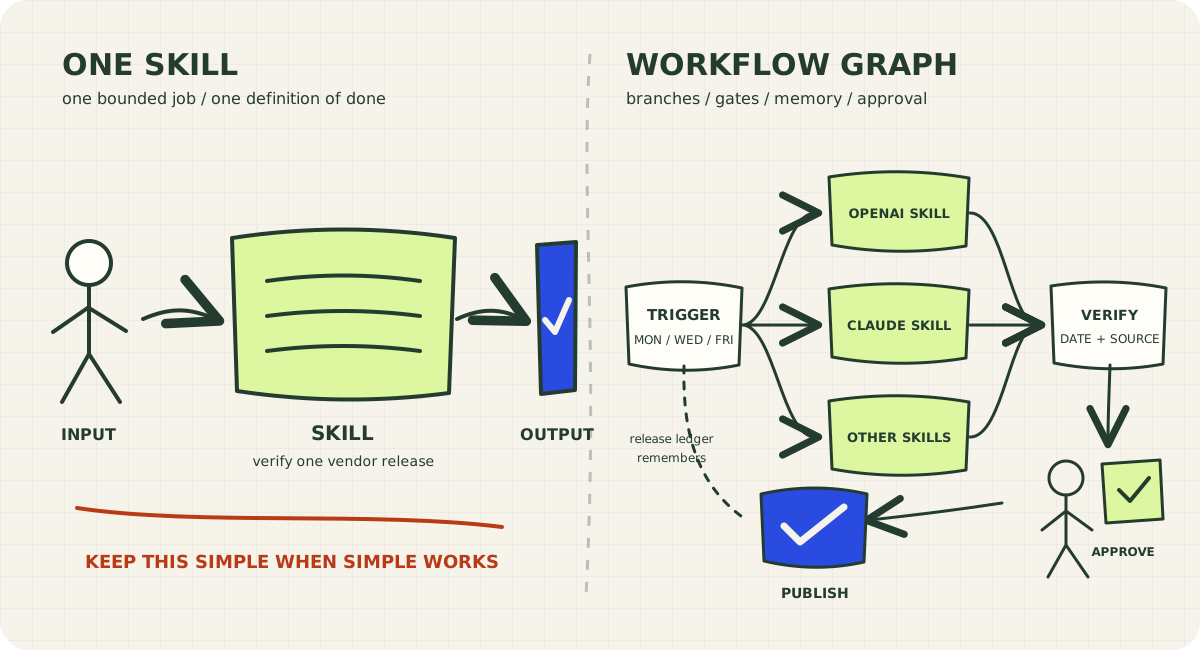
Use the left side until the work genuinely needs the right side.
The Anthropic phone rumor is real, recycled, and slightly scrambled
Anthropic does have a phone-based assignment feature. It did not launch last week.
On March 23, 2026, Anthropic described Dispatch as one continuous Claude conversation available from phone or desktop. A user can assign work from a phone, move on, and open the finished result on a computer. Dispatch can also start Claude Cowork or Claude Code sessions. Anthropic's Dispatch announcement.
The announcement also introduced computer use for Cowork and Claude Code in research preview. At that time, Anthropic said the desktop application needed to remain awake and running.
So the rumor contains a real product, but the date is wrong and "texting or calling" compresses different capabilities into one sentence.
A live voice-call change did ship last week in another product.
On September 10, Viktor added a setting that cuts off Viktor's playback as soon as the microphone detects that the user is speaking over it. The feature works in Talk to Viktor and Infinity mode and is off by default. Viktor's changelog.
This is exactly why an update service needs a verification gate. The useful question is not merely, "Did somebody say this feature exists?" It is:
- Which product shipped it?
- On what date?
- Is it generally available, in beta, or behind a setting?
- What can the user actually do?
- What requirement gets omitted when the news travels through three social posts and a group chat?
The internet is an efficient game of telephone. Occasionally, it adds a phone feature to make the metaphor complete.
The smaller releases revealed the bigger operating model
The clearest signals came from the controls surrounding the work.
Viktor separated steering from queueing
On September 9, Viktor gave users a choice when messaging during an active run: steer the work now or queue the instruction for after the current run finishes. On September 12, it added an installable adapter for Agent Client Protocol clients, along with scoped keys and approvals. Its September 7 approval update moved "Always approve" into a menu and led with a plain-language description of what the tool would do.
That is good agent design in miniature. A new instruction needs explicit timing. Access needs a scope. Approval needs to describe the consequence, not merely display a rectangle of JSON and hope the human enjoys archaeology.
Grok Build treated workflows like operations
Across September 7 through 11, Grok Build added visible due times for Watchers and Loops, clickable workflow status, controls to pause or stop background workflows, more useful subagent output, MCP reauthorization signals, inherited timeout settings, and monitor events that can wake idle sessions. Grok Build's changelog.
This is what separates a workflow from a decorative diagram. An operator can see when it will run, whether it is working, what failed, what a child returned, and how to stop it.
If your graph looks elegant but nobody can answer those questions, you have built modern art.
Hermes made reliability the feature
Hermes Agent v0.21.2, released September 11, concentrated on state database reliability, multi-profile isolation, credential handling, and plugin management. Its release notes describe a password-blind vault, a curated SHA-pinned plugin catalog, searchable connector tools, and fixes intended to stop one profile from receiving another profile's secrets or transcripts. Hermes Agent releases.
That is less glamorous than a model benchmark and considerably more relevant when the agent can sign in, run on a schedule, and touch several business systems.
An agent with memory and credentials is an operating system with opinions. Treat isolation, recovery, and auditability as product requirements.
Perplexity moved authentication toward the connector layer
Perplexity's API changelog, last modified September 13, lists September updates for custom remote MCP connectors and OAuth access to its own remote MCP server. Compatible clients can connect to https://api.perplexity.ai/mcp and sign in with Perplexity instead of copying an API key into each client. The page does not assign an exact day to each September item, so those changes should not be presented with false precision. Perplexity's API changelog.
The architecture lesson is precise even when the release date is not: credentials belong in the connection layer. A skill should know how to research. It should not contain the secret that allows the research.
Build the three-times-weekly update as a workflow
For Sevedge Builds, I would not make one giant "write AI news" skill and put it on a timer.
I would build this:
- Schedule: Monday, Wednesday, and Friday starts.
- Research branches: One bounded researcher per vendor checks approved first-party sources in parallel.
- Verification gate: Reject items outside the date window, undated claims, secondary-source rumors, and availability claims the vendor does not support.
- Ranking: Score practical consequence, implementation value, novelty, and source confidence.
- Writing: Apply the Sevedge Builds voice to the strongest one to three ideas, not the entire pile.
- Evaluation: Recheck dates, links, implementation instructions, duplication, and whether the article makes a defensible point.
- Human approval: Review before publication.
- Durable record: Save release IDs and URLs already covered so Friday does not rediscover Wednesday with fresh enthusiasm.
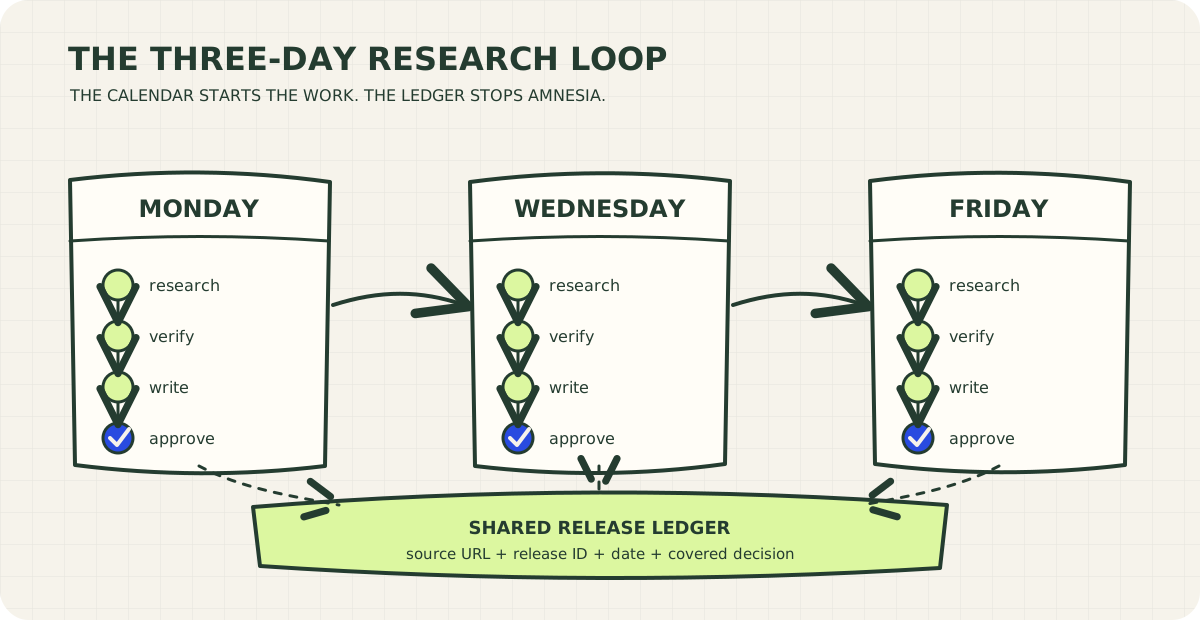
Three runs, one memory. The ledger keeps the cadence from becoming repetition.
Each vendor researcher can use a skill. The sequence and gates belong in the workflow graph. The sites and APIs are connectors. The schedule starts the graph. The release ledger is durable state. Publication remains behind an approval gate.
That system can later earn more autonomy. It should not receive it as a signing bonus.
Pressure-test the build before giving it a calendar
Ask these questions:
| Failure | Control |
|---|---|
| A rumor is attributed to the wrong vendor. | Require a first-party source and exact product name. |
| An old feature is reported as new. | Store the original announcement date and the last-covered URL. |
| A changelog only names a month. | Label the uncertainty instead of inventing a day. |
| Five vendors ship minor changes. | Rank for practical consequence and publish fewer items. |
| One research branch fails. | Produce a partial draft with the missing source named, not silently omitted. |
| The same run starts twice. | Use a durable key based on vendor, release ID, and article window. |
| The article is accurate but useless. | Require a concrete implementation or operating change for every included item. |
| The system publishes something consequential. | Keep publication behind a named human approval. |
The goal is not to create the fastest summary of release notes. Vendors already publish release notes.
The goal is to make a judgment they do not make for you: What should a business operator change because this happened?
Last week supplied a clear answer. Connect the work to live context. Preserve repeated judgment as skills. Coordinate multi-step work with workflows. Use agents where the route genuinely has to remain open. Make schedules visible. Store state. Isolate risky execution. Explain approvals. Measure what repeats before you standardize it.
A skill remains valuable.
It just should not be asked to run the entire company from a Markdown file.
Copy this into your AI platform
Use this when a recurring AI process has outgrown a single chat. It works as a starting brief in Claude, Claude Code, ChatGPT, Codex, Grok, Hermes, Viktor, or another capable agent platform.
Download the standalone AI Workflow Architecture Brief
# Architect this recurring AI process

Help me turn the process below into the simplest reliable AI system that can run repeatedly. Do not assume I need an autonomous agent or a workflow graph. Start with the smallest architecture that can meet the result, then add complexity only when you can name the failure it prevents.

## The process

- Business result: [What useful outcome should arrive?]
- Trigger or schedule: [What starts the work, and in which time zone?]
- Inputs: [Files, systems, websites, databases, messages, or human decisions.]
- Output: [Exact deliverable and destination.]
- Current manual steps: [List the steps as they happen today.]
- Rules and definitions: [Terms, thresholds, exclusions, brand voice, or policies.]
- Consequential actions: [Anything that sends, publishes, spends, edits, deletes, or changes access.]
- Expected volume: [Runs, records, files, or tasks per period.]
- Acceptable cost and delay: [Budget and delivery window.]
- What must be remembered: [Prior results, processed IDs, decisions, or nothing.]
- Human owner: [Who reviews failures and approves consequential actions?]

## Classify each part before designing it

Use these layers deliberately:

1. **Prompt:** one-off reasoning or generation that does not need a durable reusable procedure.
2. **Skill:** a bounded, repeatable procedure with stable instructions, inputs, and output. A skill explains how to perform work. It does not create a schedule, connection, or durable runtime by itself.
3. **Connector or MCP server:** access to current external data or tools. Keep authentication in the provider or secret store, never inside the prompt or skill.
4. **Workflow or graph:** predefined sequencing, branches, parallel work, handoffs, retries, gates, or aggregation. A graph may call skills at its nodes.
5. **Agent:** open-ended work where the necessary steps cannot be known in advance and environmental feedback must guide the next action.
6. **Schedule, loop, watcher, or event:** the trigger that starts or wakes the work. State what happens if a run is late, missed, duplicated, or overlaps another run.
7. **Durable state:** memory required across runs, including processed-item IDs, prior findings, checkpoints, and audit history.
8. **Approval gate:** a named human decision before sending, publishing, spending, deleting, editing live records, changing permissions, or taking another consequential action.
9. **Isolated execution:** a worktree, sandbox, temporary environment, or limited account when the work changes code, files, or systems.

## Decision rules

- Use one prompt when one prompt reliably produces the result.
- Create a skill only after the procedure has repeated enough to reveal stable steps and edge cases.
- Use a workflow graph when the process has branches, parallel research, dependencies, retries, or separate review stages.
- Use an agent when the route must change based on what it discovers. Bound its tools, time, spending, and stopping conditions.
- Give every recurring process a durable duplicate key when repeating an external action would cause harm or confusion.
- Prefer direct connectors over screen control. Use screen control only when a precise integration is unavailable and the risk is acceptable.
- Do not treat a successful tool call as a successful business outcome. Verify the final deliverable.
- Do not automate publication or other consequential delivery until a draft-only run has been inspected.

## Produce this deliverable

Return:

1. **Recommended architecture:** A short plain-language description of the minimum viable system.
2. **Layer map:** A table mapping every part to prompt, skill, connector, workflow, agent, trigger, state, approval, or isolation. Explain each choice.
3. **Flow:** A numbered run from trigger to verified result, including failure and retry paths.
4. **Skills to create:** For each proposed skill, give its purpose, trigger conditions, required inputs, steps, output contract, edge cases, and what it must not do.
5. **Workflow graph:** Only if justified. List nodes, transitions, branches, parallel work, gates, retry limits, and stopping conditions.
6. **Connections and credentials:** Current data sources, minimum permissions, credential location, and expiration or reauthorization behavior.
7. **State and deduplication:** What persists, where it persists, retention, and the duplicate key.
8. **Human controls:** What requires approval, who owns it, and what the approval screen or brief must show.
9. **Verification plan:** Tests for a normal run, missing data, stale credentials, partial failure, duplicate input, retry, and a missed schedule.
10. **Cost and operating limits:** Expected model, tool, and infrastructure costs with explicit assumptions. Label estimates as estimates.
11. **Build order:** The smallest draft-only version first, followed by the conditions that would justify each additional layer.
12. **First implementation step:** One concrete action we can complete now.

Flag unknowns. Cite current official documentation for platform-specific claims. Do not invent successful tests, available integrations, prices, permissions, or release behavior.